LMS
LMS
Last updated on 10th Jun 2026| 11265

- Introduction to SAP ABAP Programming
- SAP ABAP Development Environment Overview
- ABAP Data Types and Variables
- ABAP Control Structures
- Modularization Techniques in ABAP
- Database Access using Open SQL
- Classical and Interactive Reports in ABAP
- Smart Forms and SAP Scripts
- Enhancements and User Exits in ABAP
- Conclusion
Introduction to SAP ABAP Programming
SAP ABAP Programming (Advanced Business Application Programming) is the core programming language used to develop applications on the SAP platform. It enables developers to customize SAP systems and build business logic that supports enterprise processes. For freshers, learning ABAP is the first step toward understanding how SAP applications are extended and tailored to organizational needs and SAP ABAP Training . ABAP programs are executed on the SAP NetWeaver Application Server, and they form the backbone of custom reports, interfaces, enhancements, and forms. This tutorial introduces the basics of ABAP, explaining its role in SAP’s ecosystem and why it remains relevant despite new technologies like SAP HANA and Fiori. Freshers learn how ABAP integrates with SAP modules, enabling seamless communication between business processes. The section emphasizes the importance of mastering syntax, data types, and modularization techniques. It also highlights how ABAP supports both procedural and object-oriented programming, giving developers flexibility in design. Beginners are guided through the SAP GUI and ABAP Workbench, where they write and test their first programs. The tutorial stresses the importance of debugging and performance optimization, which are critical for real-world applications. By the end of this section, learners understand ABAP’s purpose, its role in SAP customization, and the career opportunities it opens in development and consulting. This foundation prepares freshers for deeper exploration of ABAP concepts and hands-on practice.

SAP ABAP Development Environment Overview
- SE80 Workbench: The central hub for ABAP development. Beginners learn how to create programs, classes, and function modules. The tutorial covers navigation, project organization, and includes practice with building simple objects.
- SE38 Editor: Used for creating and executing ABAP programs. Beginners explore syntax highlighting and debugging tools in our SAP ABAP Training. The tutorial explains saving and running programs, with examples such as basic “Hello World” outputs.
- SE11 Dictionary: A tool for managing database objects. Beginners learn how to define tables, views, and data elements. The tutorial explains integration with Open SQL, and practice includes creating custom tables.
- SE37 Function Builder: Designed for creating reusable function modules. Beginners are introduced to modular programming concepts, with more details available in SAP PP Tutorial with Real-Time Scenarios. The tutorial explains parameter passing, with examples showing calculation functions.
- SE24 Class Builder: A tool for object-oriented ABAP development. Beginners learn how to define classes and methods. The tutorial explains encapsulation and inheritance, with practice exercises for creating simple classes.
- Debugging Tools: ABAP provides breakpoints and watchpoints to trace program execution. Beginners learn error handling techniques, with practice sessions focused on debugging sample programs.
- Transport System: Used to move objects between environments. Beginners learn how to release and import transports. The tutorial explains version control, ensuring consistency across systems.
Ready to earn your SAP HANA Professional Certification? Discover the SAP ABAP Training now available at ACTE!
ABAP Data Types and Variables
ABAP provides a wide range of data types to handle business information. Elementary types like CHAR, NUMC, INT, and DEC are used for simple values, while structures and internal tables manage complex datasets. Freshers learn how to declare
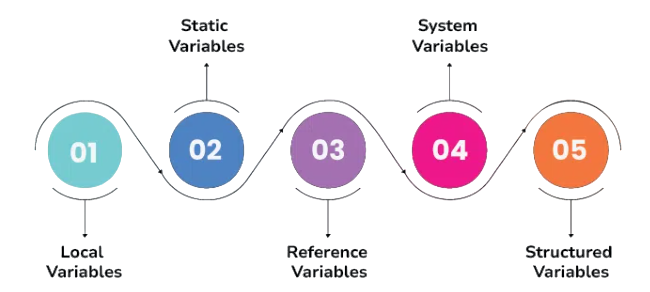
In ABAP, variables are declared using the DATA keyword, with scope and lifetime determining how they can be accessed. Constants are introduced to store fixed values, improving readability and reducing hardcoding. Field symbols and references provide dynamic memory handling, making programs more flexible. Work areas are explained as single-line structures used with internal tables, and learners can explore more in SAP Internship Tutorial for Freshers. The tutorial emphasizes that data types form the foundation of ABAP programming, enabling developers to process customer records, vendor details, and material specifications efficiently. By mastering data types, beginners gain confidence in handling SAP business data and prepare for advanced topics such as modularization and database access.
Get Your SAP HANA Certification by Learning from Industry-Leading Experts and Advancing Your Career with ACTE’s SAP ABAP Training.
ABAP Control Structures
- IF Statements: Used for conditional logic. Beginners learn syntax and nesting, with tutorials explaining decision-making in programs. Examples include validating user input.
- CASE Statements: Simplify handling multiple conditions. Beginners explore scenarios in SAP HANA Tutorial For Freshers. The tutorial highlights readability benefits, with examples such as categorizing materials.
- DO Loops: Execute blocks repeatedly. Beginners study syntax and exit conditions, while tutorials explain counters. Examples include processing records.
- WHILE Loops: Run until a condition is met. Beginners learn logical checks, with tutorials covering infinite loop risks and SAP S/4HANA Tutorial. Examples include validating entries.
- Nested Loops: Combine multiple loops for complex tasks. Beginners learn how to process tables, with tutorials explaining performance considerations. Examples include handling sales orders.
- EXIT Statements: Break loops when conditions are met. Beginners learn control flow, with tutorials explaining safe usage. Examples include stopping after specific criteria.
- CHECK Statements: Skip iterations if conditions fail. Beginners learn efficiency techniques, with tutorials explaining record filtering. Examples include skipping invalid data.

Modularization Techniques in ABAP
Modularization in ABAP improves code reusability and readability. Beginners learn how subroutines, function modules, and methods divide programs into manageable units. Subroutines are introduced as reusable blocks within a program. Function modules are explained as reusable components stored in the Function Builder, supporting parameter passing. Object-oriented modularization is introduced through classes and methods, enabling encapsulation and inheritance, with more details available in SAP SD Tutorial for Freshers. The tutorial highlights the importance of modularization in large projects, where code must be maintained and reused across multiple programs. Beginners practice creating subroutines for calculations, function modules for validations, and classes for object-oriented tasks. By mastering modularization, learners build scalable and efficient ABAP programs that align with enterprise requirements.
Database Access using Open SQL
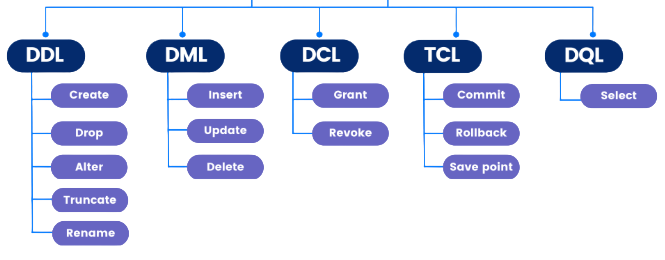
- SELECT Statements: Retrieve data from tables. Beginners learn syntax and conditions, with tutorials explaining single and multiple record selection. Examples include fetching customer data.
- INSERT Statements: Add new records to tables. Beginners explore mandatory fields, with tutorials explaining integration with master data. Examples include adding vendor records.
- UPDATE Statements: Modify existing records. Beginners study conditions, with tutorials covering safe updates and SAP MM Tutorial from Scratch For Freshers. Examples include changing payment terms.
- DELETE Statements: Remove records from tables. Beginners learn syntax, with tutorials explaining risks of mass deletion. Examples include removing obsolete materials.
- Joins: Combine data from multiple tables. Beginners learn INNER and LEFT joins, with tutorials explaining relational concepts. Examples include linking sales and customer tables.
- Aggregations: Use functions like SUM, COUNT, and AVG. Beginners explore reporting queries, with tutorials explaining grouping. Examples include calculating sales totals.
- Performance Tips: Optimize queries using indexes. Beginners learn best practices, with tutorials explaining how to avoid nested selects and SAP FICO Tutorial Step by Step For Freshers. Examples include efficient reporting techniques.
Classical and Interactive Reports in ABAP
Reports are one of the most common ABAP applications. Classical reports display lists of data, while interactive reports allow users to drill down into details. Freshers learn how to design selection screens, process user inputs,
and display outputs using WRITE statements. ABAP professionals explains event blocks like START-OF-SELECTION and END-OF-SELECTION. Interactive reports are introduced with AT LINE-SELECTION events, enabling navigation between summary and detail views. Examples include customer balance reports and material stock reports. Freshers practice building simple classical reports and enhancing them with interactive features. The section emphasizes how reports support business decision-making by providing real-time insights. By mastering reports, learners gain practical skills that are directly applicable in SAP projects.

Get JOB Oriented SAP ABAP Training for Beginners By MNC Experts
- Instructor-led Sessions
- Real-life Case Studies
- Assignments
Smart Forms and SAP Scripts
Smart Forms and SAP Scripts are important SAP technologies used for designing, generating, and managing business documents within SAP systems. These tools enable organizations to create professional outputs such as invoices, purchase orders, delivery notes, payment advices, quotations, and other business-critical documents. SAP Scripts is the traditional text and form management tool in SAP, allowing users to design document layouts and integrate dynamic data from SAP applications and SAP HCM Tutorial for Beginners In HRM . It provides a flexible way to generate formatted documents but requires more technical effort for maintenance and modifications.Smart Forms was introduced as an advanced alternative to SAP Scripts, offering a graphical interface that simplifies form design and development. It enables developers to create and maintain forms efficiently using drag-and-drop functionality, reducing dependency on extensive coding. Smart Forms supports dynamic formatting, conditional processing, tables, graphics, and multilingual output, making document generation more flexible and user-friendly. Organizations widely use Smart Forms to improve document consistency, streamline communication, and enhance business processes. Together, SAP Scripts and Smart Forms play a vital role in SAP output management by ensuring accurate, professional, and automated document generation across various business functions.
Set to Ace Your AWS Job Interview? Check Out Our Blog on SAP ABAP Interview Questions & Answer
Enhancements and User Exits in ABAP
- User Exits: Predefined points in SAP programs. Freshers learn how to add custom logic. The tutorial explains safe modifications. Examples show customizing sales order processing.
- Customer Exits: Delivered by SAP for extensions. Freshers learn how to activate them. The tutorial explains integration with function modules. Examples show adding validation checks.
- BADI (Business Add-Ins): Object-oriented enhancements. Freshers learn how to implement interfaces in our SAP ABAP Training . The tutorial explains flexibility. Examples show customizing purchase order approvals.
- Implicit Enhancements: Inserted at predefined points. Freshers learn syntax. The tutorial explains risks of misuse. Examples show adding custom fields.
- Explicit Enhancements: Developer-defined points. Freshers learn how to create them. The tutorial explains modularity. Examples show extending reports.
- Modification Assistant: Tool for managing changes. Freshers learn how to track modifications and SAP Simple Finance Tutorial. The tutorial explains upgrade safety. Examples show adjusting standard programs.
- Best Practices: Always prefer enhancements over direct changes. Freshers learn compliance importance. The tutorial explains upgrade compatibility. Examples show sustainable customization.
Conclusion and Career Path in SAP ABAP
Learning SAP ABAP Programming provides freshers with a strong foundation in enterprise programming. By mastering data types, control structures, modularization, database access, reports, forms, and enhancements, learners gain practical skills that are directly applicable in SAP projects. ABAP developers play a critical role in customizing SAP systems to meet business requirements, ensuring efficiency and compliance. The tutorial emphasizes continuous learning, as SAP evolves with new technologies like HANA, Fiori, and CDS views. Career opportunities for ABAP developers are vast, ranging from entry-level programming roles to advanced positions such as technical consultants and solution architects in our SAP ABAP Training. With experience, ABAP professionals can specialize in areas like performance optimization, integration, or move into leadership roles. The global demand for SAP expertise ensures long-term career growth. Ultimately, this tutorial equips freshers with the knowledge and confidence to begin their journey in SAP ABAP, opening doors to rewarding opportunities in enterprise software development and consulting.